
Billing & credits
What a message costs, how wallets work, and how earnings reach a creator.
Kopai runs on prepaid credits. You buy them in advance and spend them as you go. There's no bill at the end of the month, and no way to run one up by accident.
What a message costs
A message has two parts.
Runtime infra is what the turn actually cost to run: tokens in and out at your model's rate, plus every tool call, file lookup and generated file. A short question to a small model is a fraction of a credit. A long research task with web searches on an expensive model is many times that.
Publisher add-on is what the creator charges, on marketplace agents only. It can be zero. Your own private agents have no add-on.
A few things follow:
- The model matters most. Nothing else you change moves the cost per message as much as switching models.
- Tools aren't free. Web search in particular costs noticeably more per call than the message it's part of.
- Long conversations cost more per message, because the recent history is re-read every turn. Kopai caps that at the last 30 messages.
Holds
Before a turn runs, Kopai reserves an estimate from your balance. When the answer finishes, the hold is released and replaced by the real charge, which is usually lower. That's why a pending line can appear and then change, and why a turn can't overdraw you.
Free messages
Most public agents let you send three to five messages before charging anything. The count is per agent and shown on its card.
Your personal wallet
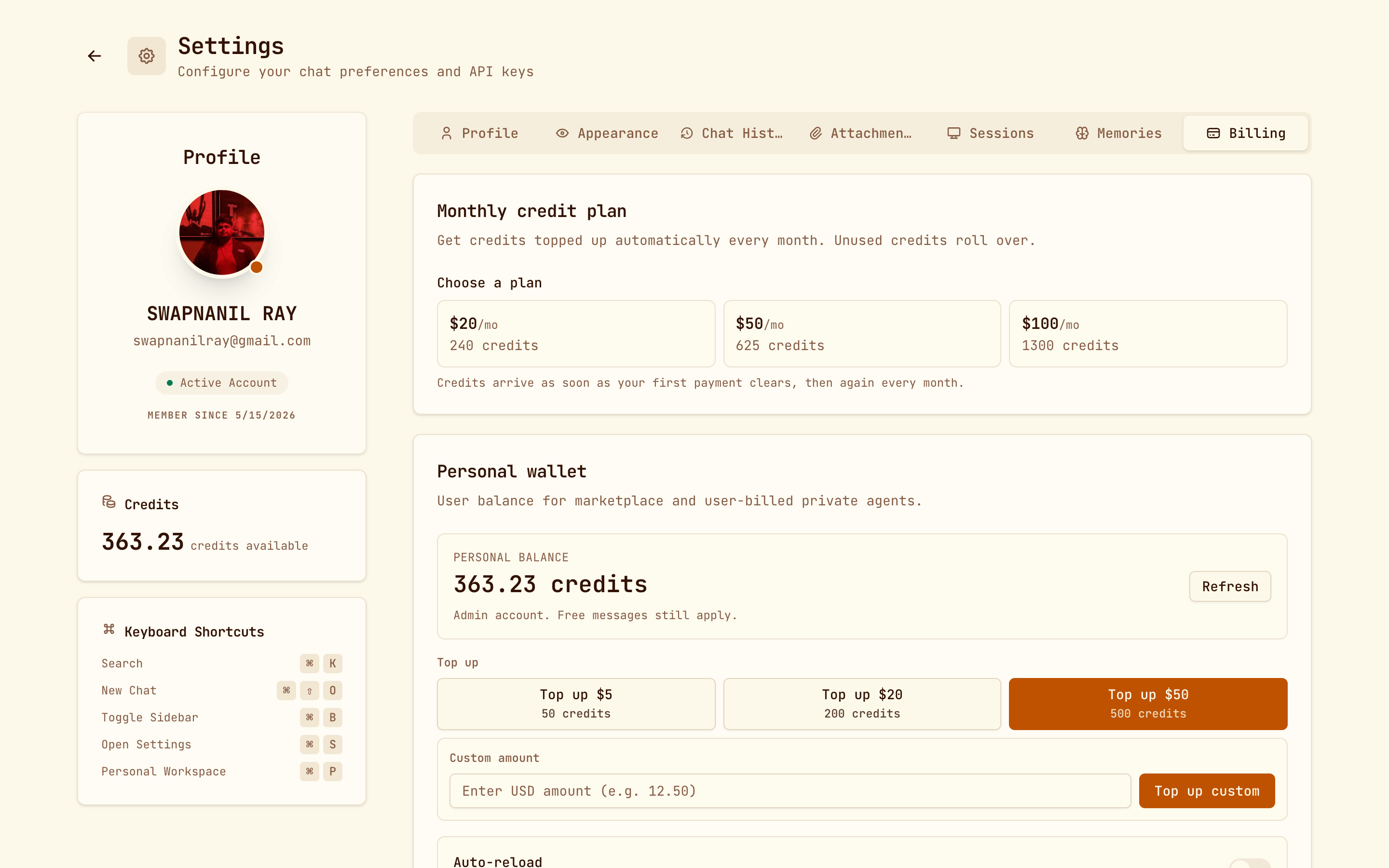
Settings → Billing. This balance pays for marketplace agents and, by default, for your organization's private agents too.
Topping up
One-off top-ups, paid through Stripe:
| Pay | Get |
|---|---|
| $5 | 50 credits |
| $20 | 200 credits |
| $50 | 500 credits |
You can also enter any custom amount in dollars.
Monthly credit plan
If you use Kopai regularly, a monthly plan is better value than topping up:
| Plan | Credits each month | Credits per dollar |
|---|---|---|
| $20 a month | 240 | 12 |
| $50 a month | 625 | 12.5 |
| $100 a month | 1,300 | 13 |
Credits arrive when your first payment clears and again every month. Unused credits roll over, and if you cancel you keep whatever you've already received.
Auto-reload
Switch this on and Kopai tops you up when your balance drops below 5 credits. It needs a card on file, and the packs include 10% extra:

| Pay | Get |
|---|---|
| $5 | 55 credits |
| $20 | 220 credits |
| $50 | 550 credits |
Auto-reload switches itself off after repeated payment failures rather than retrying forever.
Transaction history
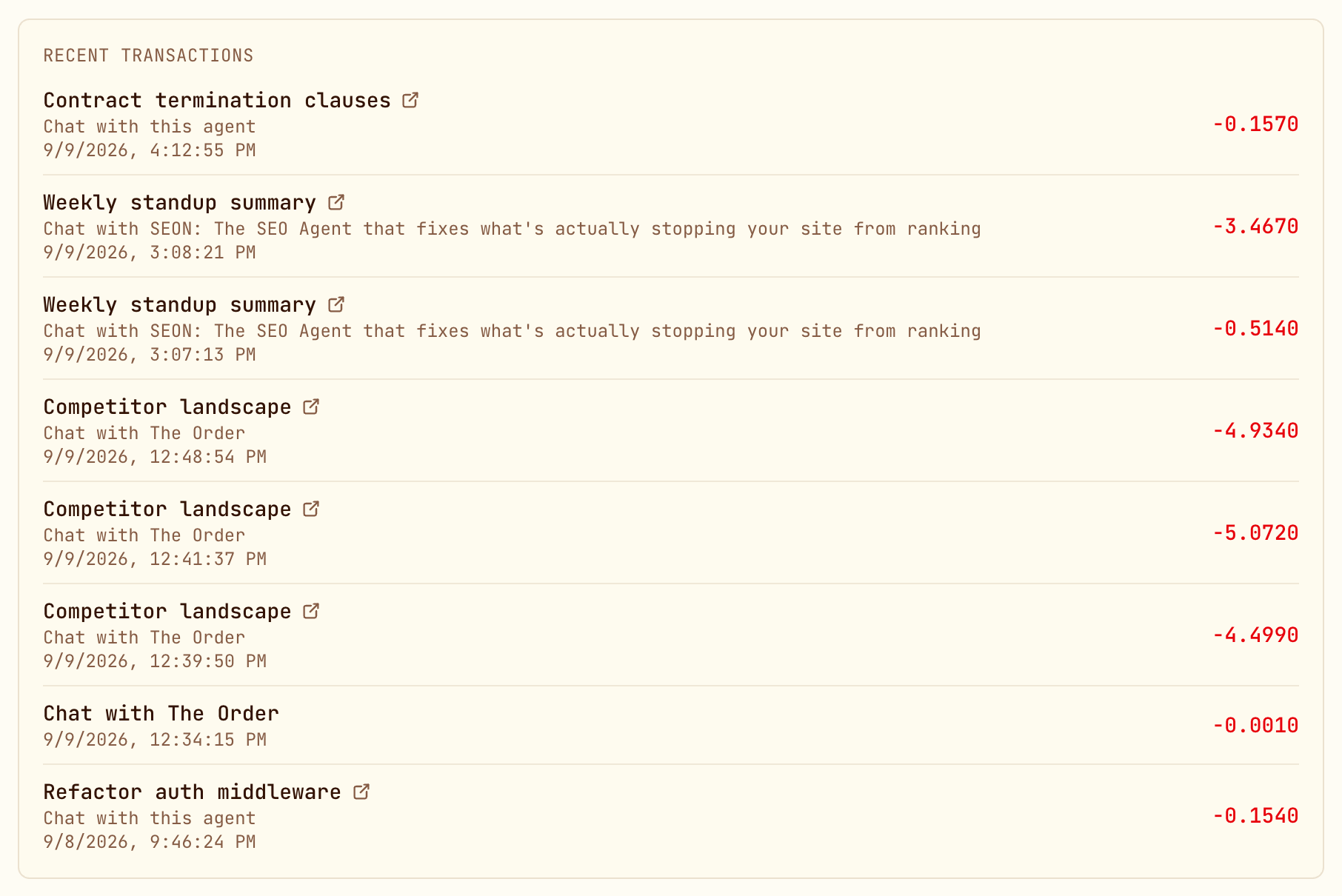
Every charge, hold, release and top-up is listed with a timestamp, the conversation it belongs to, and a link back to that chat. Amounts go to four decimal places, because single messages really do cost fractions of a credit.
The organization wallet
Org → Organization Wallet. It's separate from your personal balance and does two jobs.
Paying for private agent runs
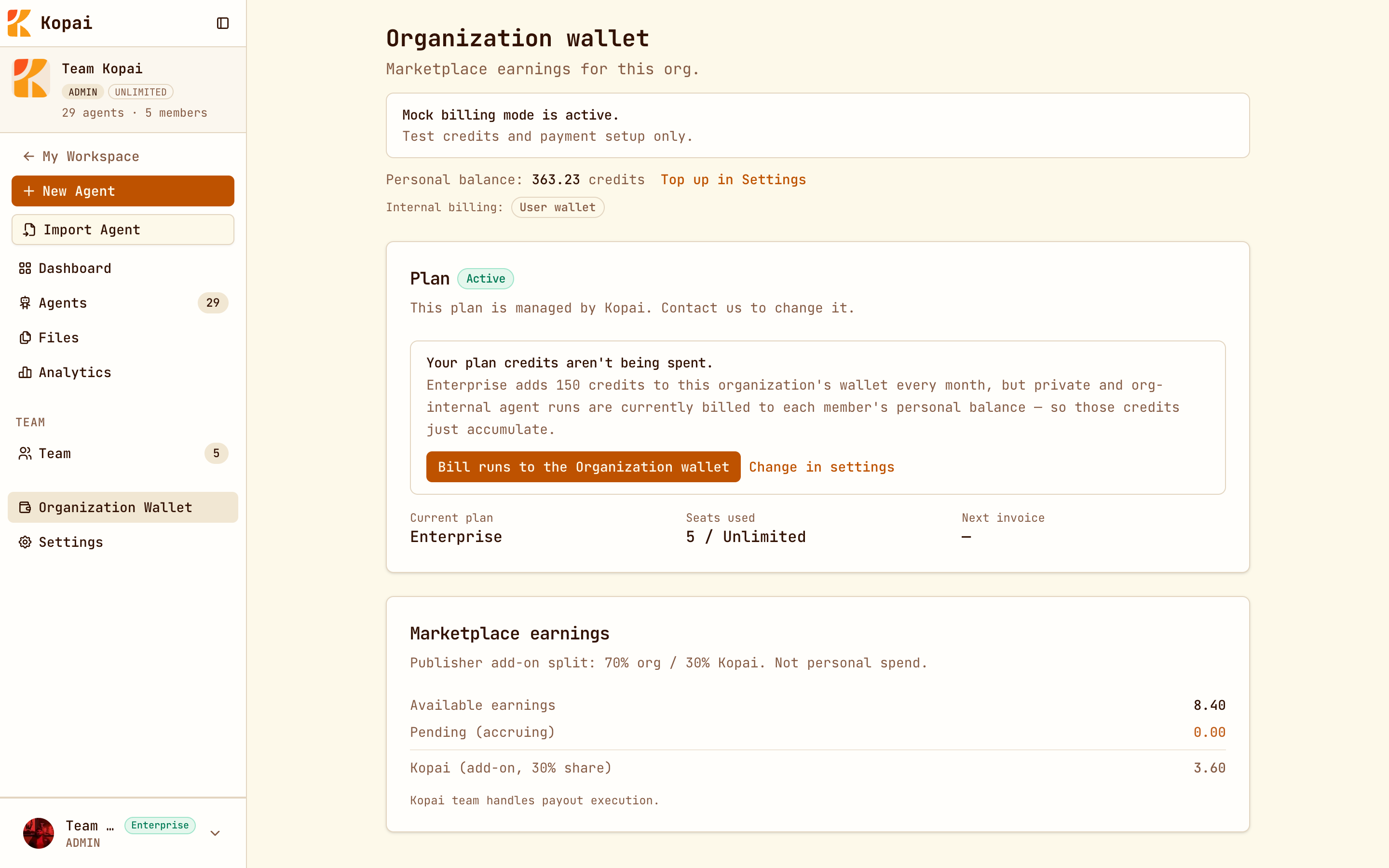
Each organization chooses who pays when a member runs one of its private agents:
| Setting | Who pays |
|---|---|
| User wallet | Each member's own balance. The default. |
| Organization wallet | The shared organization balance. |
Owners and admins change this in the wallet page or in org settings. If your organization's plan grants monthly credits but members are still being charged personally, this is the setting to check: plan credits sit unspent until runs are billed to the org.
Receiving earnings
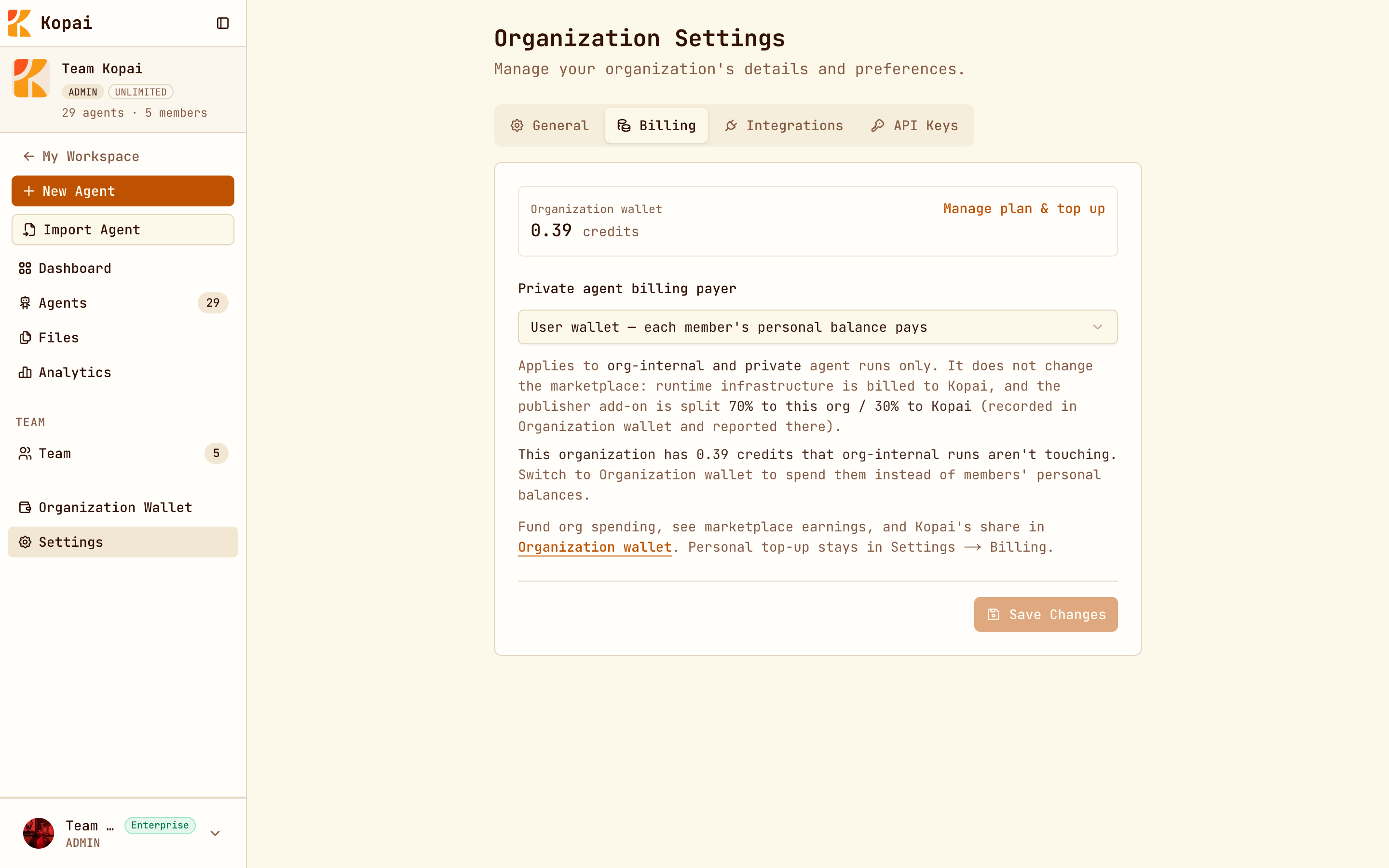
Marketplace earnings land here, shown as three figures:
| Available earnings | Settled and ready to pay out. |
| Pending (accruing) | Conversations that haven't finished settling. |
| Kopai (add-on, 30% share) | Kopai's cut, shown for transparency. |
Earnings and payouts
When someone chats with your public agent:
- Runtime infra covers what the run cost. It's never split, and none of it counts as earnings.
- The publisher add-on is split 70% to your organization, 30% to Kopai.
So an agent with no add-on earns nothing however popular it gets. That's a fine choice for an internal or reputation-building agent, but it is a choice.
Payouts are currently handled by the Kopai team rather than a self-serve button, with a minimum of 50 credits before a withdrawal. Contact Kopai from the wallet page to arrange one.
Organization plans
Plans unlock features. Credits are still bought separately.
| Free | Business Starter | Enterprise | |
|---|---|---|---|
| Price | $0 | $20 a month | By arrangement |
| Monthly org credits | None | 150 | None |
| Members | 2 | 5, with extra seats | Unlimited |
| Files per agent or project | 10 | Unlimited | Unlimited |
| Org storage | 20 MB | 150 MB | Unlimited |
| Subagents per agent | 2 | 5 | Unlimited |
| Connected apps per agent | 3 | 6 | Unlimited |
| Test Bench, image models, analytics | No | Yes | Yes |
| API access | No | 100 requests a minute per key | 1,000 requests a minute per key |
Upgrade from Org → Organization Wallet or Org → Settings → Billing. If Kopai manages your plan, that page says so and points you to the team instead. Enterprise is always arranged directly with Kopai.
Anyone can create private agents, publish to the marketplace, and use web search on the free plan.
Keeping costs down
What actually works, roughly in order of impact:
- Use a smaller model for everyday work. Save a large model for tasks that genuinely need it, and use Test Bench to settle the question with evidence.
- Switch off tools the agent doesn't need. Web search on an agent that works only from its own documents is pure cost.
- Start a new chat when you change subject. History is re-read every turn.
- Be careful with group chats. Five agents means five charges per question.
- Check analytics. It shows cost per agent, so you can find the expensive one instead of guessing.